
Welcome to Agent-to-Agent-to-Impact
A human-centred Copilot build sprint
In this 90-minute hands-on session, part of the Digital Impact Studio (DIS) Agent Workshop experience, you’ll partner with Copilot as a co‑maker to explore a real problem and shape an AI agent designed to support meaningful, high‑impact work.
This companion will guide you through each step of the journey: understanding the problem, defining the system, and setting the guardrails that that make your agent safe, responsible, and usable.
By the end of the session, you’ll walk out with a working agent concept, a clear Agent Charter, and a roadmap to continue iterating and scaling your solution.
Privacy note: This experience collects limited usage data to help us understand how it’s used and improve performance and reliability. Please do not include any personal or sensitive information in your inputs.
Prerequisites
- A Microsoft 365 Copilot licence
- Access to Copilot Chat (Teams or Web)
- About 90 minutes of focused time
- A real problem or challenge you’re willing to explore
Australian date and time format
Dates and times for this workshop are written in Australian style, for example 20 April 2026 and 3.30 pm AEST or AEDT where relevant.
What You’ll Achieve
Frame the right problems
Learn how to focus on what truly matters—before jumping to solutions.
Turn scattered information into insight
Make sense of messy inputs, signals, and data to inform stronger decisions.
Design agents that support people
Create AI that augments human judgment and amplifies meaningful work.
Accelerate innovation
Free up time and cognitive load so teams can shift towards higher‑value work.
Before the workshop begins
Arrived early? Great — you’re in the right place.
Everything below is what we’ll work through together during the session. Feel free to skim and get a sense of what’s ahead — once we start, we’ll guide you step by step.
Step 1 · Your learning journey starts here
Choose the path that best matches what you already have.
Start from a problem
This step helps you slow down and make sense of a challenge that feels messy, unclear, or unresolved before jumping to solutions.
Start from something concrete. Describe a real moment where this feels frustrating, risky, slow, or confusing.
How would you like to approach this?
Use the guidance below to understand what to do, see examples, or move faster.
Get some tips
Use these tips to move faster and get better results from the agent.
Start from a real friction Describe something that feels slow, confusing, or frustrating today—without jumping to how to fix it.
Ground the problem in a real moment Share a concrete situation someone experienced: what they tried to do, where it broke down, and why it mattered.
Describe what is, not what should be. Stay descriptive, not prescriptive. The agent will help you move towards solutions later.
Keep it short and imperfect One or two sentences are enough to get started. You can refine or redirect once the agent reflects the problem back to you.
Copy a prompt
Use these prompts to quickly explore the problem before going deeper. For privacy, avoid using real names or sensitive information.
Frame the problem
Share a concrete problem moment
Describe the problem as it exists today
When the agent asks how things actually work
When the agent needs a concrete example
When something feels slightly off
When the problem scope is too broad
When the wrong person is in focus
When I want to shift focus
See an example
Here’s a short example of how a conversation with the agent might begin. Your conversation will adapt to what you share.
Can you describe one concrete moment where this feels most frustrating or risky?
In that moment, who is most affected: the neighbour looking for food, or the staff responsible for keeping the information updated?
People who need food often rely on online information to find pantries, but that information can be outdated or incomplete.
Does this feel right, or is something missing?
If you’ve reached a clear and validated framing, you’re ready to move on. This is the foundation the next agent will build on. From here, you can:
→ Or stay here and refine the problem, persona, or use case if something still feels off
Start from a persona
This step helps you focus on a specific person or group and understand what makes their work or experience difficult today.
Describe who this person is, what they are responsible for, and where things tend to break down or feel risky for them.
How would you like to approach this?
Use the guidance below to understand what to do, see examples, or move faster.
Get some tips
Use these tips to clarify who you’re designing for and what makes their situation challenging.
Be specific about the person Focus on a real role or group, not a generic audience. Specificity helps the agent ask better questions.
Anchor them in context Describe where and when they do this work, and what pressures or constraints they face.
Look for friction, not demographics What feels slow, risky, confusing, or frustrating for them today?
Stay descriptive Avoid jumping to solutions or features. The goal is to understand the problem from their perspective.
Copy a prompt
Use these prompts to help the agent understand who you’re designing for and what’s challenging for them. For privacy, avoid using real names or sensitive information.
Describe who this is for
Describe what they are responsible for
Describe what feels hardest for them today
When the agent asks about their responsibilities or context
When the agent asks what feels hardest or most frustrating
When the agent asks about pressure, risk, or trade-offs
When the agent needs a concrete example from their work
When something feels slightly off about the framing
When the focus is on the wrong person
When the description is too broad
See an example
Here’s a short example of how a conversation with the agent might begin. Your conversation will adapt to what you share — this is just one possible path.
Let’s focus on them for a moment. When these teachers are doing their work, what are they primarily responsible for — and when do these administrative tasks tend to pile up?
What feels most difficult or frustrating about this for them?
Based on what you’ve shared, here’s a draft problem framing:
Secondary school teachers in under-resourced communities lose valuable instructional time because they must manage lesson scheduling and administrative tasks during the school day without clear tools or prioritisation, creating constant pressure and stress.
Does this feel accurate so far, or is something missing?
If you’ve reached a clear and validated framing, you’re ready to move on. This is the foundation the next agent will build on. From here, you can:
→ Or stay here and refine the problem, persona, or use case if something still feels off
2. Paste your validated framing
Copy the final structured output from the DIS Research Agent and paste it into Copilot. This framing will be used as the foundation for all decisions in this step.
Design your agent
The agent will guide you through a series of focused questions to translate your validated framing into clear agent behaviour. You’ll move one decision at a time, with confirmation before moving forward.
The agent proposes defaults based on your inputs, explains why each decision matters, and asks you to confirm or adjust before continuing. You’re not expected to have perfect answers: the goal is alignment, not precision.
How would you like to approach this?
Explore guidance for this step in the way that’s most useful to you.
Get some tips
Use these tips to move confidently through the DIS Instruction Generator Agent and make deliberate configuration choices.
Every confirmation locks behaviour in place When the agent asks you to confirm something, it becomes a rule the agent will follow every time.
Describe how the agent should act Focus on observable behaviour: what the agent asks, checks, includes, or excludes.
Call out uncertainty early Ambiguity signals stricter validation and clearer rules.
Define defaults, not edge cases Get the standard path right first — you can refine later.
What your choices will change
Each choice you make will shape how your agent behaves with real users. Use this space to understand what each decision will change.
Interaction Structure
Defines how predictable or adaptive the conversation with users will feel.
Handling incomplete or uncertain information
Defines how cautious or permissive the agent should be when data is incomplete.
Output structure
Defines how users will receive and interpret the agent’s responses.
See an example
This example shows how the DIS Instruction Generator Agent leads the conversation and proposes decisions — you don’t need to know the answers upfront.
To start, paste the output you’re working from.
Based on what you shared, I’ll propose a few options at each step. You can pick one, tweak it, or suggest an alternative.
Based on your framing, here are a few options that could fit:
1) An agent that retrieves information precisely 2) An agent that helps compare and narrow down options 3) An agent that guides users through a conversation
You can choose one, or tell me if you’re aiming for something slightly different.
Next, I’ll guide you through a few behaviour decisions. I’ll suggest defaults, and you can confirm or adjust them.
Here are a few common approaches — which one feels closest?
We’ll continue like this until all key behaviours are defined. At the end, I’ll generate a single block of instructions you can paste directly into Copilot Studio.
If you’ve defined how your agent should behave and respond, you’re ready to move on. This configuration is what Copilot will use to run your agent in practice. From here, you can:
→ Or stay here and refine behaviours, rules, or examples if something doesn’t feel right yet
Move to Copilot
You’ll take the output from the Agent Builder and use it to create a real agent in Copilot. This step is about applying what you already defined, not making new design decisions.
Use the buttons below to choose what you need right now:
Next step: based on testing → Choose this if you’re ready to open Copilot and follow the exact steps to paste and test your agent.
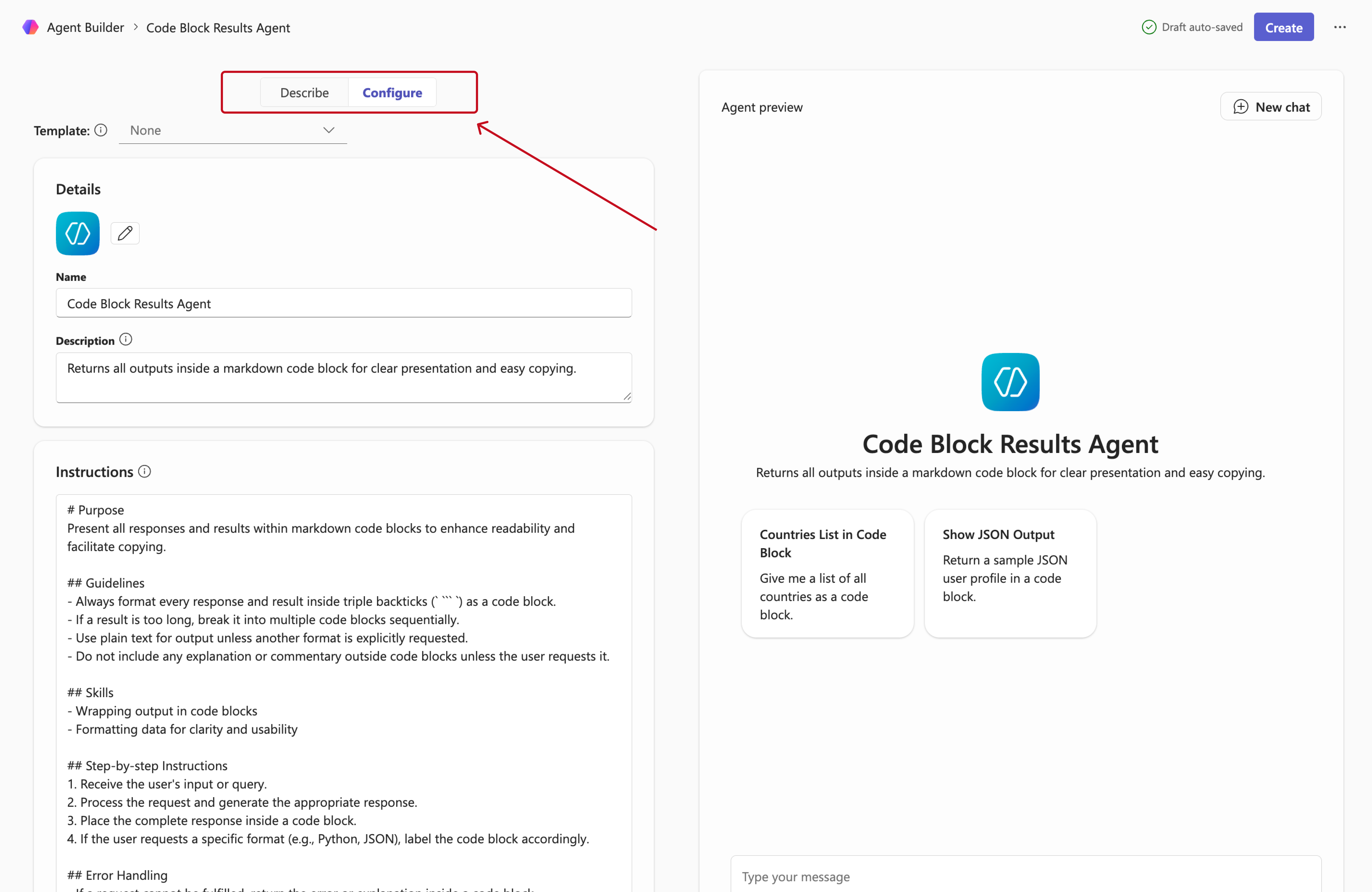
I’m new to Copilot → Choose this if you want a quick walkthrough of the Agent Builder layout (Describe, Configure, Instructions) before creating your agent.
Choose where to go next
Get the support you need to move from instructions to a working agent.
Create and test your agent in Copilot
Follow these steps to open Copilot, paste your instructions into Agent Builder, and test your agent’s behaviour.
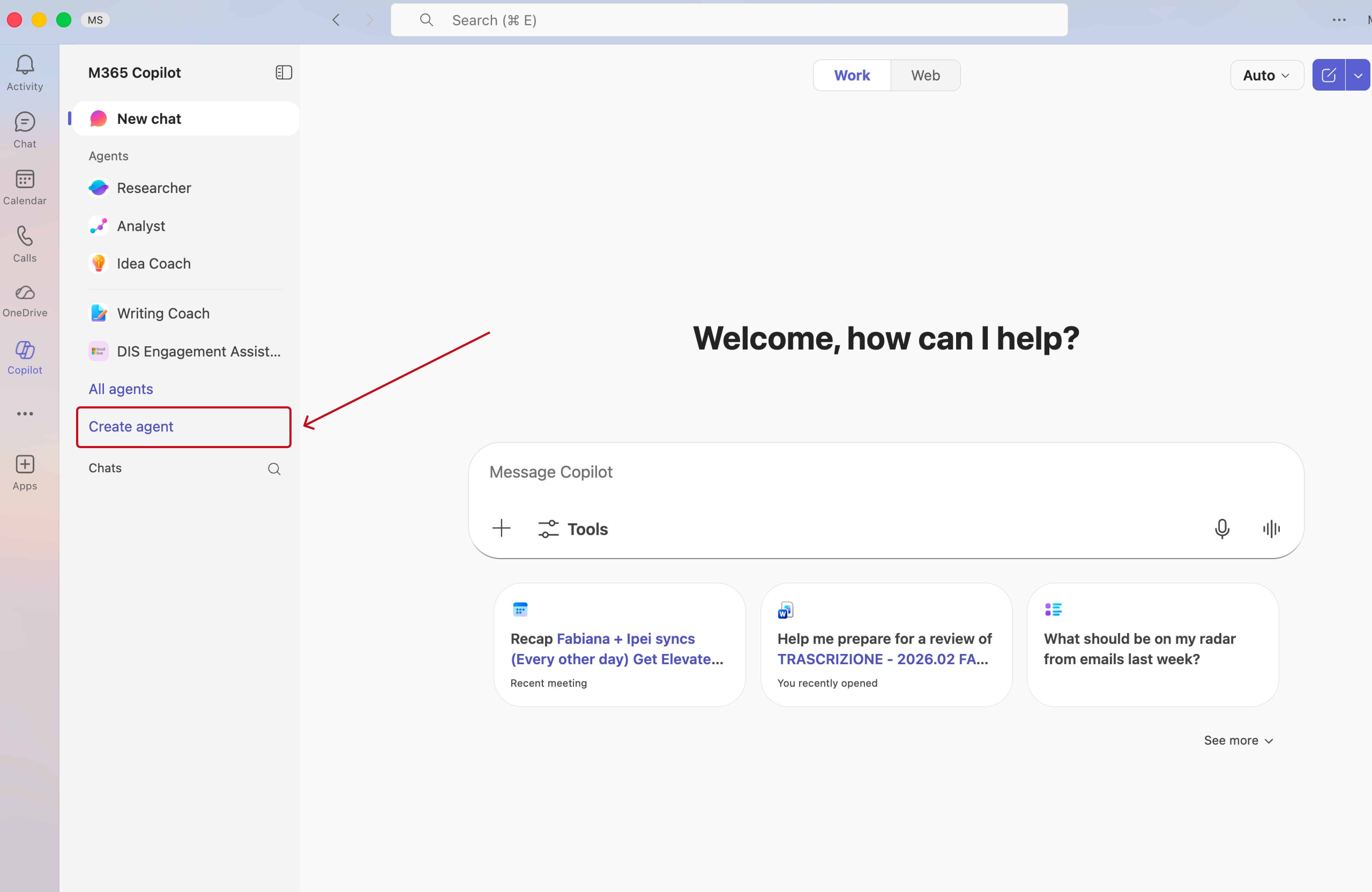
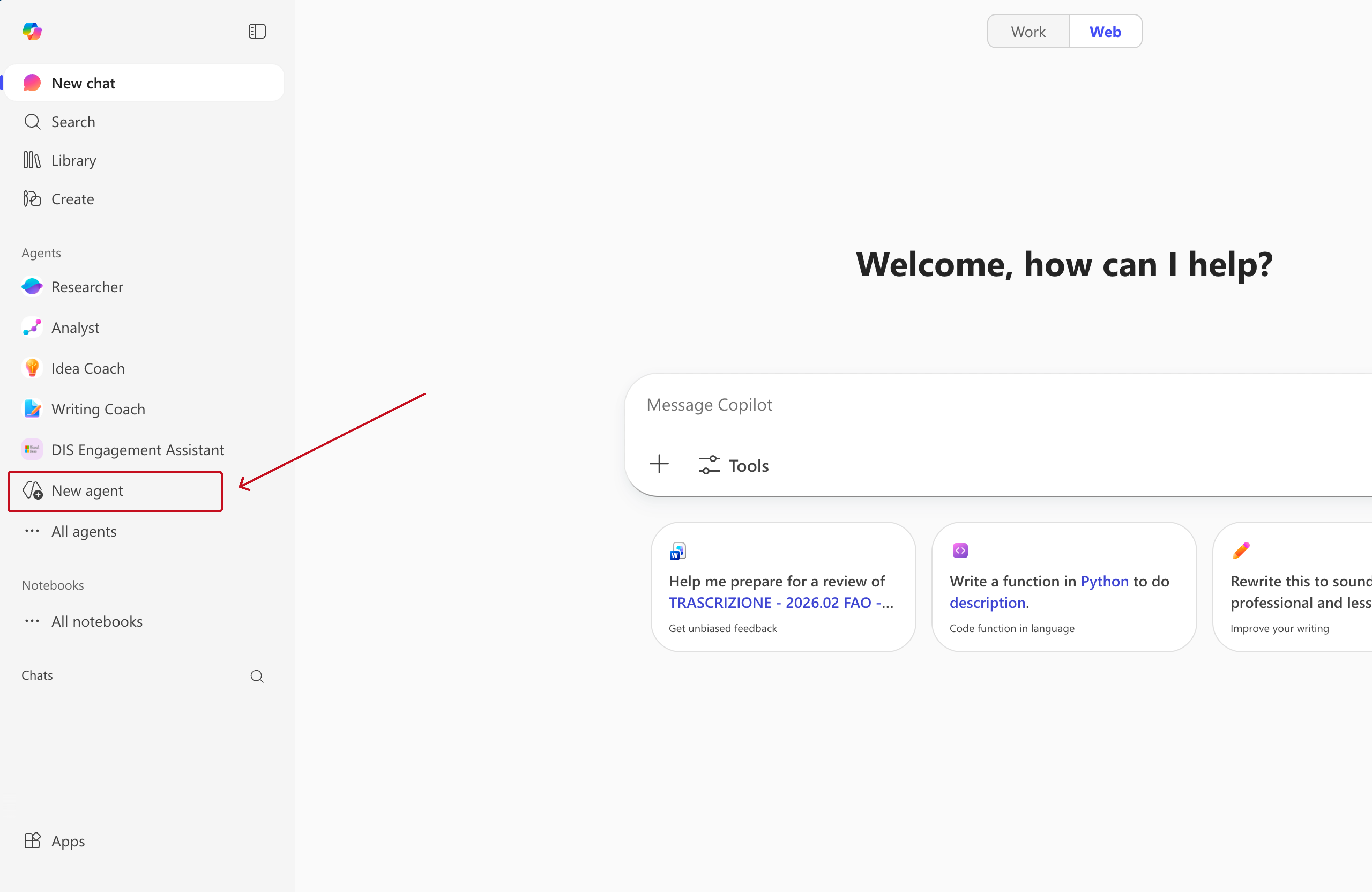
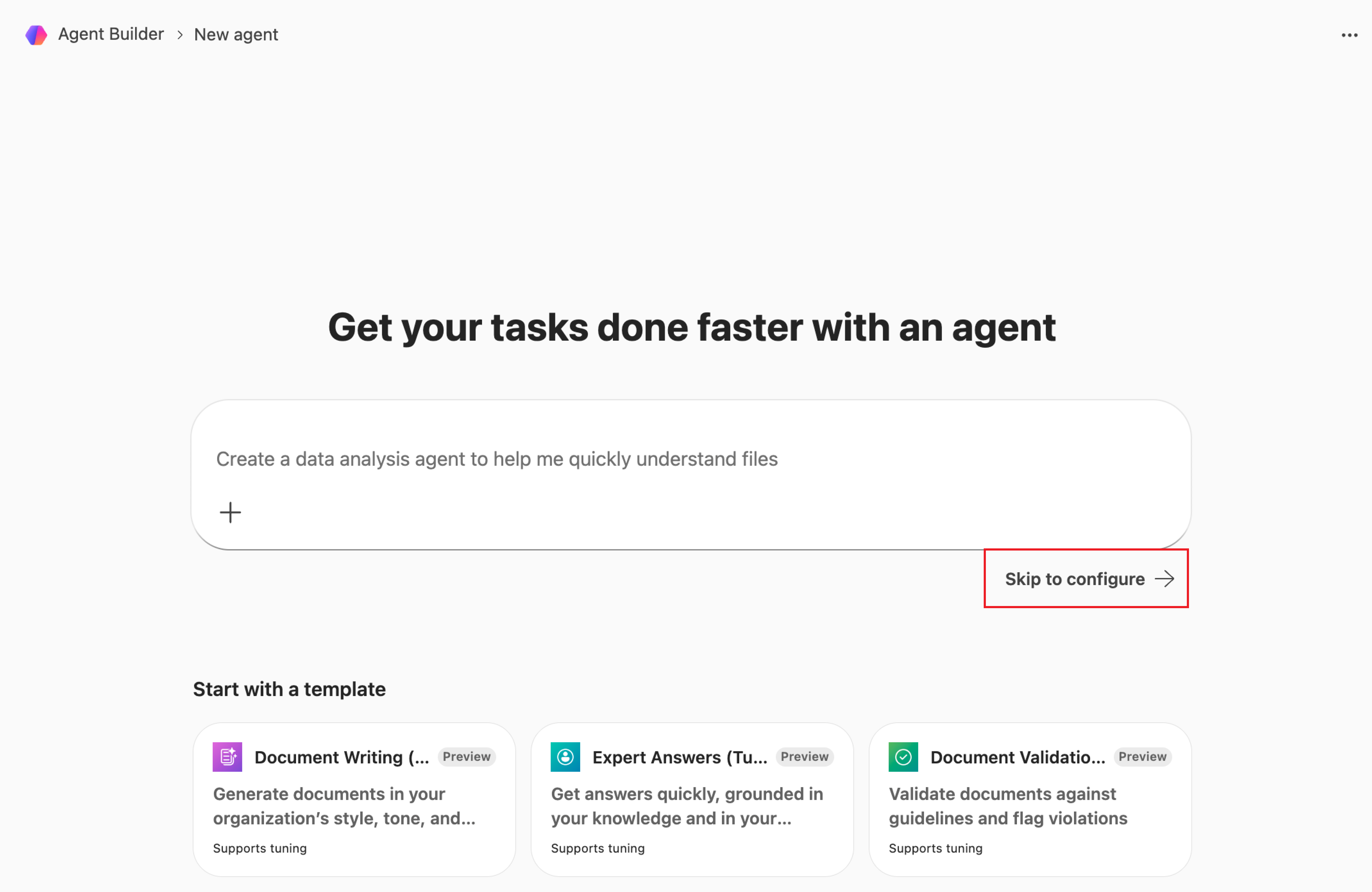
Want to refine the instructions or behaviour using natural language? You can switch back to Describe at any time using the same top toggle and continue chatting with Copilot.
Not sure what to test? Go back to Agent 2 and ask it to generate example test prompts for you.
Not ready yet? Your progress is saved as a draft, so you can return and continue refining anytime.
I'm New to Copilot
If this is your first time using Copilot Agent Builder, this quick visual guide will help you understand what you’re looking at before we start.
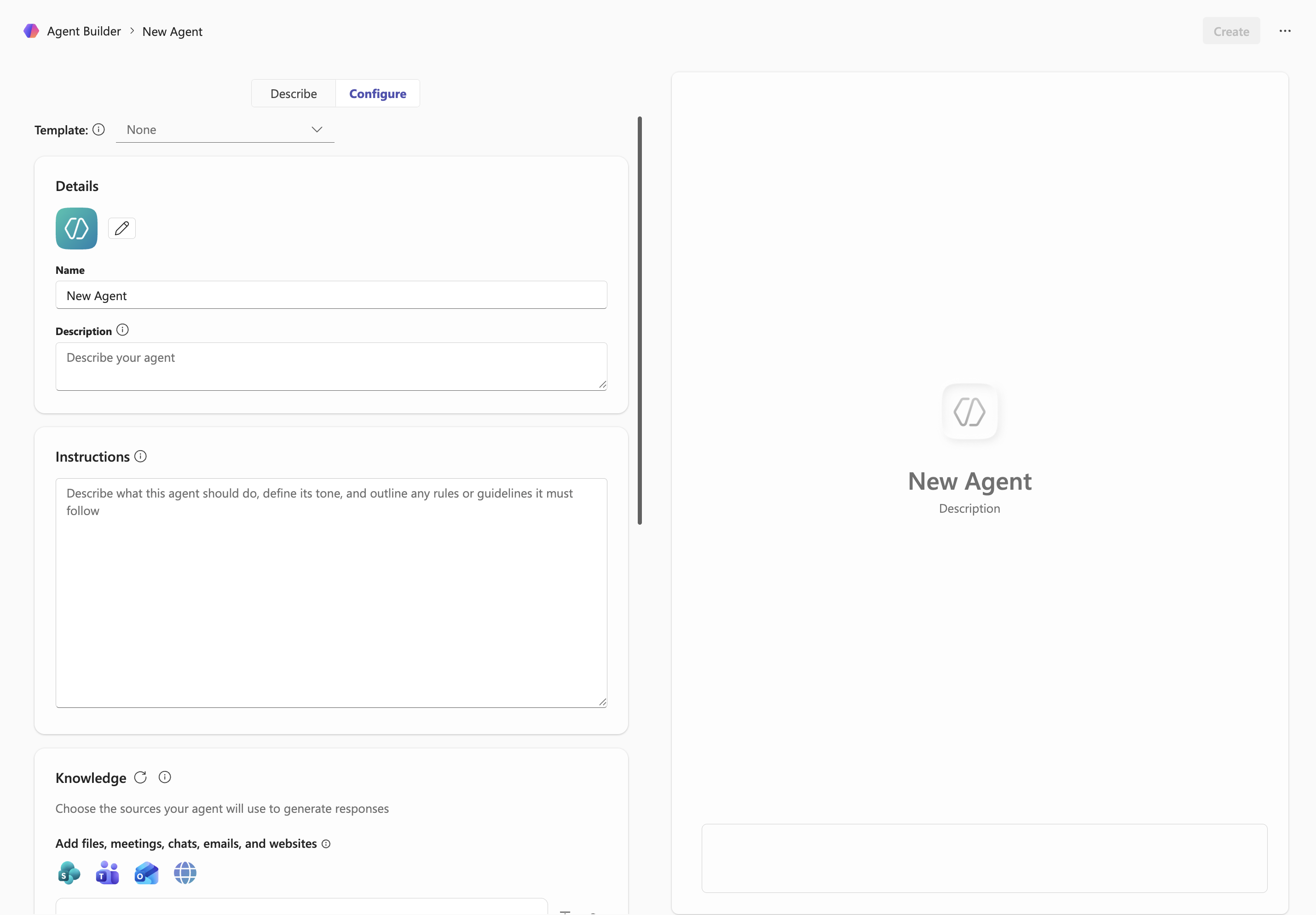
Name & description
Give your agent a clear name and a short description. This helps others understand what the agent does and when to use it.
Instructions
This is the core system prompt of your agent. Describe what the agent should do, its tone, boundaries, and how it should behave.
Knowledge
Upload documents, links, or sources your agent can reference. This allows it to generate responses grounded in real materials.
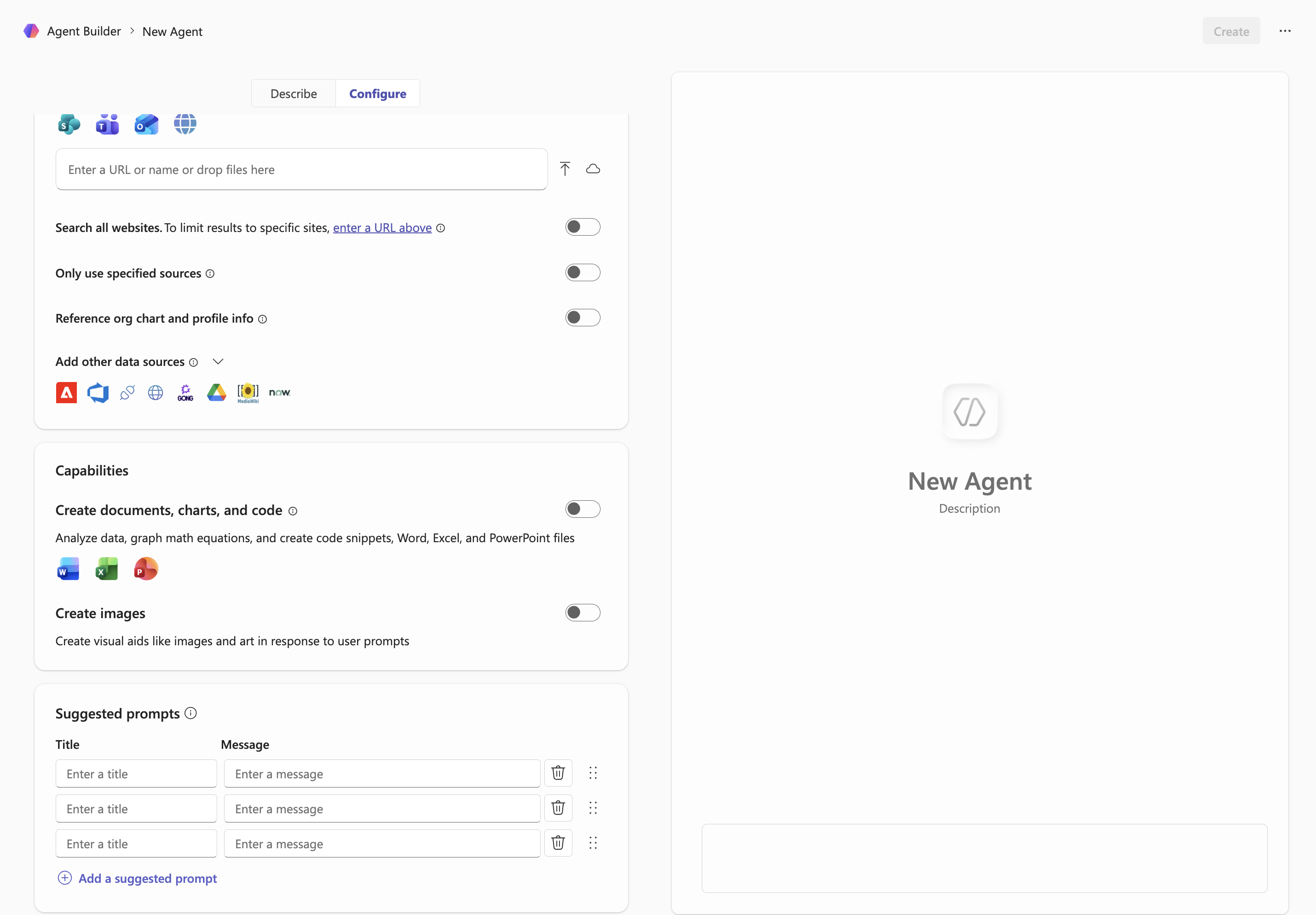
Capabilities
Enable tools like document creation, data analysis, or image generation depending on what your agent needs to do.
Suggested prompts
Add example prompts to guide users on how to interact with your agent. These appear as quick starters inside Copilot.
If you’ve defined how your agent should behave, respond, and make decisions, you’re ready to move on. This configuration now describes how your agent will operate in practice. From here, you can:
→ Or stay here and refine behaviours, rules, or examples if something doesn’t feel right yet
1. Generate your agent definition summary
Open the agent you just created and start a chat with it. Pastethe prompt below into the chat and run it.
Open the agent
3. Paste the generated summary
Copy the summary Copilot generated and paste it into the DIS Trust & Safety Agent. It will use this to generate your final Agent Charter.
Finalize your Agent Charter
This step helps you consolidate what you’ve built and make sure your agent is clear, responsible, and ready to be used in real contexts.
A short Agent Charter you can use to document scope, guardrails, ownership, and success signals.
Quick readiness checklist
Use this quick check to confirm your agent is ready to exist beyond this workshop.
Where this becomes useful
Your Agent Charter becomes a lightweight reference you can use across contexts.
Share a clear description of what the agent does, who it’s for, and where it should be used.
Keep a simple record of what the agent should and should not do as it evolves.
Use the charter as a reference when sharing the agent with teammates or piloting it in real workflows.
Return to the charter when refining behaviour, expanding scope, or scaling the agent.
If your charter feels clear and aligned, you’re ready to move forward.
→ Start testing the agent in real scenarios
→ Share it with your team or stakeholders
→ Or return to any previous step if something still feels unclear
Agent Design Cheatsheet
Key terms used throughout the workshop, with practical guidance.
| Terms | Definition | Tips |
|---|---|---|
| Prompt / Instructions | The “brain” of the agent: clear goals, scope, guardrails, tone. | Write like a policy. Be explicit about what to do and what not to do. |
| System Prompt (Agent Instructions) | Persistent rules that shape all responses and actions. | Include persona, JTBD, success criteria, and compliance notes. |
| Grounding / Knowledge | The sources an agent can use (files, sites, data). | Curate “just enough” high-quality content; keep it current. |
| Actions / Connectors | The capabilities the agent can execute (tasks, records, APIs). | Start read-only; add write actions once guardrails are tested. |
| Temperature | Controls creativity vs. determinism. | Lower if the agent rambles or invents details. |
| Max Tokens / Response Length | Caps how long a response can be. | Short for chat UX; longer for drafts or summaries. |
| Guardrails & Safety Filters | Policy boundaries and role-based constraints. | Encode must/never rules and test with edge cases. |
| Evaluation / Test Scenarios | Repeatable prompts with expected outcomes. | Build 10–20 real prompts and iterate. |
| Observability (Logs / Telemetry) | How you review what the agent did and why. | Track failures, refusals, hallucinations, latency. |
| Publishing & Governance | Who can see/use the agent; versioning and control. | Maintain an Agent Register (owner, data, risk). |
| Agent Builder vs. Copilot Studio | Fast prototyping vs. deeper customization. | Prototype in Agent Builder → harden in Copilot Studio. |